
WordPress Security Cleanup Guide
For GoDaddy Shared Hosting Accounts
Signs You’ve Been Hacked
- Unusual traffic spikes in GoDaddy resource usage
- WordPress dashboard not working correctly
- Large
error_logfiles (100MB+) - Unfamiliar PHP files with random hash names in your folders
Example: in your site’s uploads folder a file name similar to ” deleteme.wp5107d.php” also known as a “deleteme.wp[hash].php” file.
Before You Start
You’ll need access to:
- cPanel Terminal — In cPanel, scroll to the Advanced section and click Terminal. In the below instructions, insert your root login name for the YOUR_USERNAME portion of the provided commands
- phpMyAdmin — In cPanel, under Databases
- File Manager — In cPanel, under Files
Replace YOUR_USERNAME throughout this guide with your actual cPanel username (shown at the top of cPanel after login).
Step 1 — Find and Delete Malware Files
In cPanel scroll down until you see the Advanced section with a Terminal icon.
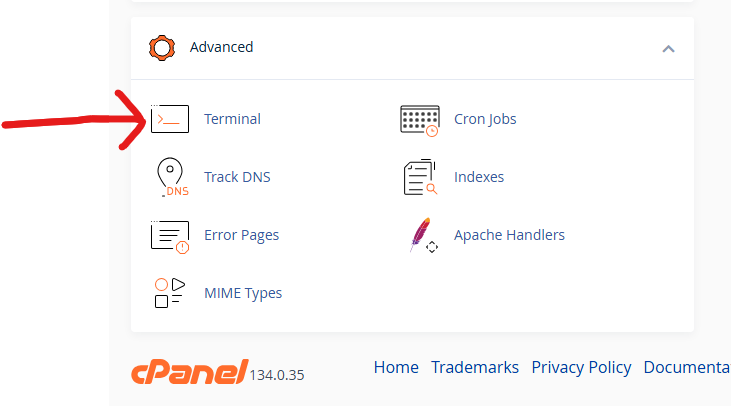
Open Terminal and run this to preview what will be deleted (this does NOT delete anything yet):
find /home/YOUR_USERNAME/ -name "deleteme.wp*.php" -type fIf files are listed, delete them all with this command:
find /home/YOUR_USERNAME/ -name "deleteme.wp*.php" -type f -deleteVerify they’re gone — this should return nothing:
find /home/YOUR_USERNAME/ -name "deleteme.wp*.php" -type fStep 2 — Check for PHP Files in Uploads Folders
PHP files should never exist in uploads folders. Find any that don’t belong:
find /home/YOUR_USERNAME/websites/ -name "*.php" -path "*/uploads/*" -not -path "*/aios/*" -type fDelete any results that aren’t legitimate security plugin files (files in /aios/firewall-rules/ are safe — leave those alone).
Step 3 — Block xmlrpc.php on All Sites
xmlrpc.php is a common attack vector that lets hackers brute-force passwords thousands of times per second. Block it on all your sites at once with this Terminal command:
for htaccess in /home/YOUR_USERNAME/websites/*/; do
  if [ -f "${htaccess}.htaccess" ]; then
    if ! grep -q "Block xmlrpc" "${htaccess}.htaccess"; then
      sed -i '1s/^/# Block xmlrpc attacks\n<Files xmlrpc.php>\nOrder Deny,Allow\nDeny from all\n<\/Files>\n\n/' "${htaccess}.htaccess"
      echo "Updated: ${htaccess}.htaccess"
    else
      echo "Already blocked: ${htaccess}.htaccess"
    fi
  fi
done
Each site will report either “Updated” or “Already blocked”.
Step 4 — Check Database for Injected Code
In phpMyAdmin, select your WordPress database and run this SQL query:
SELECT option_name, LEFT(option_value, 200)
FROM wp_options
WHERE option_value LIKE '%eval(%'
OR option_value LIKE '%base64_decode%'
OR option_value LIKE '%<script%';
This should return zero rows. If it returns results, those database entries contain injected code that needs to be cleaned.
Step 5 — Check for Rogue Admin Accounts
In phpMyAdmin, run this on your WordPress database:
SELECT ID, user_login, user_email, user_registered
FROM wp_users;
Delete any accounts you don’t recognize.
Step 6 — Delete Large Error Logs
In File Manager, find and delete any error_log files over 10MB in your WordPress root folders. They will regenerate clean automatically.
After Cleanup — Secure Your Account
Complete all of these steps to prevent reinfection:
- ✅ Enable cPanel 2FA — cPanel → Two-Factor Authentication → set up with Authy or Google Authenticator
- ✅ Change cPanel password — through your GoDaddy account portal (not inside cPanel)
- ✅ Change WordPress admin passwords on all sites
- ✅ Install Wordfence (free) on each WordPress site — scans for malware, blocks attacks
- ✅ Install All In One WP Security (free) — firewall and login protection
- ✅ Update all plugins and themes — outdated software is the #1 entry point for hackers
- ✅ Enable WordPress 2FA — Wordfence includes this feature
- ✅ Enable GoDaddy account 2FA — godaddy.com → Account Settings → 2-Step Verification
How Attackers Got In — Common Causes
- Outdated plugin with a known security vulnerability — the most common cause
- Weak admin password brute-forced via xmlrpc.php
- Outdated theme with a file upload vulnerability
- Shared hosting spread — one hacked site can infect all others on the same hosting account
Guide prepared by Matthew Gray · SacPro Home Inspections · sacprohomeinspections.com